The problem
Customers suffer from orders stuck between cashier, kitchen, and delivery chats.
How it fixes it
The system fixes this with one POS flow that pushes tickets to the kitchen and keeps dine-in, takeaway, and delivery in sync.
Loading...
Loading…
Desktop product
Elfaham Café & Restaurant System: unified Windows desktop for 25+ modules — POS, KDS, entertainment floor plan, multi-monitor displays, inventory, CRM, accounting, WhatsApp, and LAN customer panels. Offline SQLite on your PC with bilingual EN/AR UI.
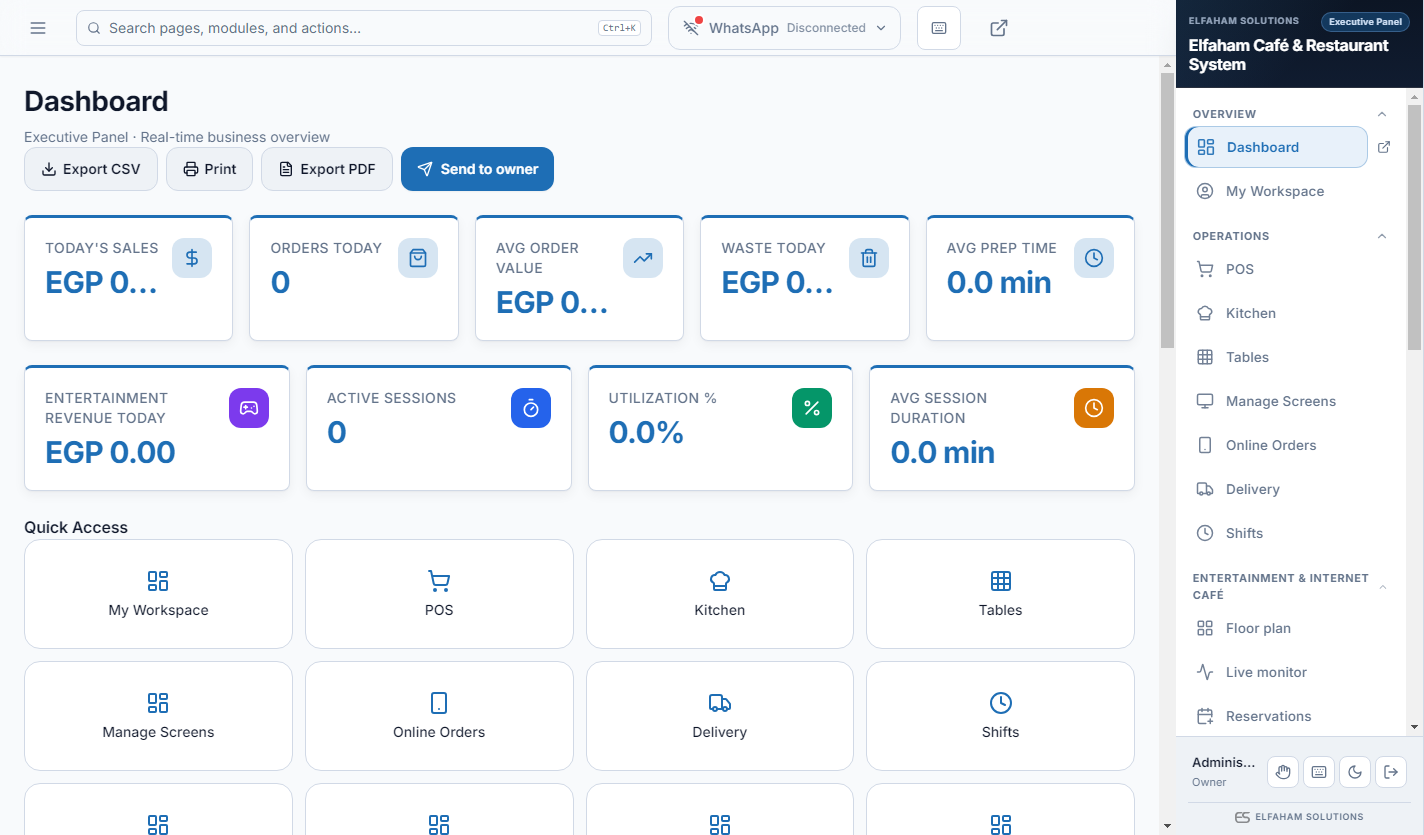
Elfaham Café & Restaurant System replaces disconnected POS, kitchen displays, delivery apps, and spreadsheets with one bilingual desktop install (v1.0.7). Includes Dashboard, My Workspace, Point of Sale, Kitchen Display, Tables & Floor Plan, Entertainment & Internet Café, Online Menu Orders, Delivery Dispatch, customer display profiles for every monitor, entertainment floor plan with timed sessions, daily order numbers, and 10 LAN/QR panels (order queue, menu board, kiosk, staff mobile). Offline SQLite, Egypt ETA VAT accounting, role-based staff panels, owner WhatsApp alerts, and full brand customization.
Download & documentation
One branch per license. When the app is available, activate your license in the desktop app or with your website account.
01 — Video
See how ElFaham Cafe System runs from front desk to billing and reports.
02 — Gallery
Browse real module screens in light and dark mode — every slide is a live product screen.

Accounting
Double - entry GL with Egypt ETA VAT
Screenshot: Light mode
03 — Solutions
Each scenario maps everyday operational pressure to how the system responds.
The problem
Customers suffer from orders stuck between cashier, kitchen, and delivery chats.
How it fixes it
The system fixes this with one POS flow that pushes tickets to the kitchen and keeps dine-in, takeaway, and delivery in sync.
The problem
Customers suffer from waste and stockouts because recipes aren’t tied to inventory.
How it fixes it
The system fixes this by linking menu items to recipes and stock so consumption is tracked as you sell.
The problem
Customers suffer from owners learning the day’s numbers only when they open Excel later.
How it fixes it
The system fixes this with owner WhatsApp summaries and clear close-of-day figures on Windows.
The problem
Customers suffer from tables and staff shifts managed on sticky notes.
04 — Capabilities
Capability highlights that map to everyday operational pain points.
05 — Modules
Screenshots grouped by work area — open any module for a full preview.
47 modules organized by work area
Group 1
Clock - in/out with grace windows
Production plans and batch stages
Assign menu, kiosk, KDS, and queue boards to monitors
Billiards, gaming, PCs, and private rooms with timed sessions
Station routing: Bar, Grill, Bakery
Secure staff sign - in with bilingual UI
templates
Mobile - friendly QR ordering from table or takeaway (Screens show the default light theme - your brand colours, fonts, and logo are fully customisable in Settings → Digital Menu Designer.)
PS5 / PC / billiards self - service hub (Screens show the default light theme - your brand colours, fonts, and logo are fully customisable in Settings → Digital Menu Designer.)
Large - format KDS for kitchen monitors (Screens show the default light theme - your brand colours, fonts, and logo are fully customisable in Settings → Digital Menu Designer.)
Order Kiosk - Counter kiosk for dine - in and takeaway (Screens show the default light theme - your brand colours, fonts, and logo are fully customisable in Settings → Digital Menu Designer.)
Screen Display - HDMI/TV menu board for dining room (Screens show the default light theme - your brand colours, fonts, and logo are fully customisable in Settings → Digital Menu Designer.)
TV - ready pickup board: In Progress & Now Serving (Screens show the default light theme - your brand colours, fonts, and logo are fully customisable in Settings → Digital Menu Designer.)
VIP room menu, session control, and billing (Screens show the default light theme - your brand colours, fonts, and logo are fully customisable in Settings → Digital Menu Designer.)
Mobile cashier checkout on café Wi‑Fi (Screens show the default light theme - your brand colours, fonts, and logo are fully customisable in Settings → Digital Menu Designer.)
Delivery list with status updates (Screens show the default light theme - your brand colours, fonts, and logo are fully customisable in Settings → Digital Menu Designer.)
Table service from phone on café Wi‑Fi (Screens show the default light theme - your brand colours, fonts, and logo are fully customisable in Settings → Digital Menu Designer.)
Categories, variants, and modifier groups
Percent and fixed discounts with promo codes
return
sale
driver - qr
Roster, payroll, and KPI tracking
Group 2
Customer profiles with Egyptian numbers
Local QR menu hosting on LAN
Bilingual QR menu themes and fonts
QR menu orders flow into POS
Fast café checkout with variants & modifiers
Visual floor plan with live table status
Group 3
Double - entry GL with Egypt ETA VAT
Expenses, suppliers, and AP
Multi - warehouse stock levels
Open/close register with float control
Group 4
Assign drivers and track delivery status
Owner alerts and daily reports
Group 5
Real - time sales KPIs and order volume
Personal shift summary and attendance
Branch branding and receipt layout
Database integrity and WAL status
Predefined café roles with PIN login
Group 6
Accounting, finance, and reconciliation
Full dashboard and all modules
Production batches, yield, and bakery workflow
POS checkout, shifts, and receipts
Kitchen display tickets and prep stations
Delivery dispatch and completion tracking
Floor plan, table sessions, and guest seating
06 — Get started
Download the app, review the presentation and user guide, or message us on WhatsApp.
One branch per license. When the app is available, activate your license in the desktop app or with your website account.
How it fixes it
The system fixes this with floor/table control and shift-aware staff operations in one place.
Plus 30 more capabilities in the module gallery below.