01
Cloud & Multi-Platform
Mobile Companion App
Mobile Companion App covers live sales, inventory, and approvals on Android & iOS — in one bilingual ERP + WhatsApp desktop suite.
- live sales
- inventory
- and approvals on Android & iOS

Loading...
Loading…
Loading…
Enterprise Cloud & Desktop ERP Suite
Elfaham Business Suite — the comprehensive commercial operating platform for enterprises, retail chains, and growing businesses: maximize profitability, accelerate checkout with high-speed POS, maintain pinpoint inventory accuracy across multi-warehouses, track real-time cash flow and margins, and drive customer loyalty with automated WhatsApp engagement across desktop, mobile, and cloud.
Start here
Download · Docs · Contact
These docs are in English (English UI screenshots). For the full Arabic version, switch the site language to العربية.
Elfaham Business Suite brings your entire commercial operations, financial control, and customer growth into a unified, intelligent platform: executive dashboard with real-time profit and cash flow KPIs, lightning-fast POS with barcode scanner and thermal printing support, comprehensive sales cycle with installments and customer credit limits, procurement and vendor management to slash operational costs, multi-warehouse inventory control with automated reorder alerts to eliminate shrinkage, automated commercial accounting with compliant P&L and tax reports, payroll and staff management, and seamless multi-branch command. Paired with the integrated WhatsApp Business Engine to build customer loyalty through broadcast marketing, AI auto-replies, and instant electronic invoice delivery. Operates 100% offline-first with instant cloud synchronization and mobile companion apps for field sales and executive monitoring.
Sub-second barcode checkout, touch terminal support, and shift handovers with automated cash drawer balancing.
Instant gross & net profit margins, itemized COGS tracking (FIFO), and strict margin protection rules.
Unified live stock across multiple warehouses, low-stock threshold alerts, and instant branch transfers.
Automated invoice PDFs, account statements, overdue payment reminders, and WhatsApp promotional blasts.
01 — Overview & Connected Surfaces
Choose a surface to see its current-version screenshots, capabilities, and the data flow between branches, users, and modules.
The complete operating picture: sales, inventory, finance, HR, and WhatsApp connected across desktop, mobile, web, and Telegram.
Operational Role: Each tenant gets an independent workspace and data boundary, with branch-aware permissions and one synchronized operational flow.
Key Capabilities & Workflows
Technical Specifications
Centrally managed & monitored in Elfaham Admin Panel
Current-version screenshots
Assets linked to this surface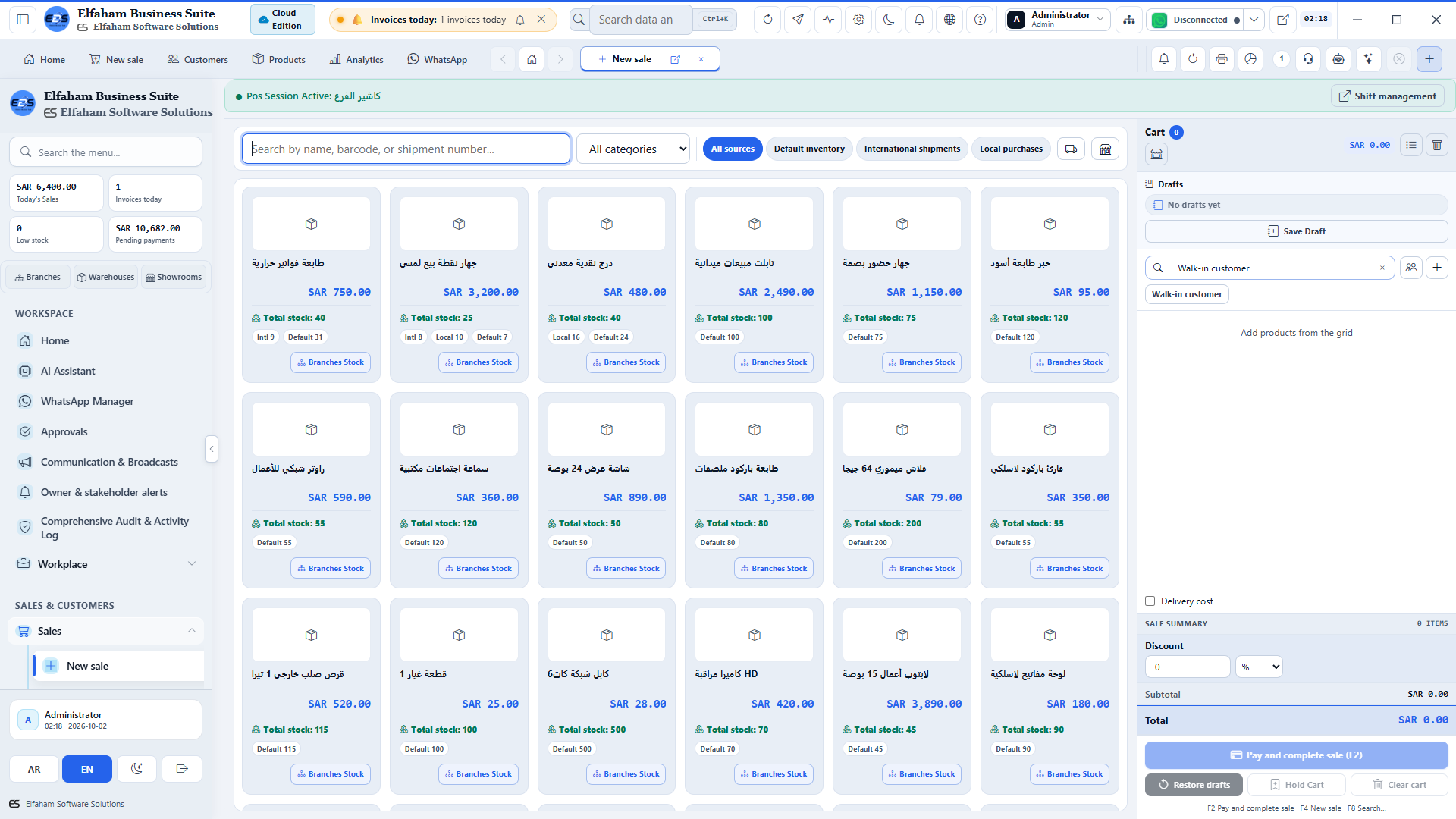
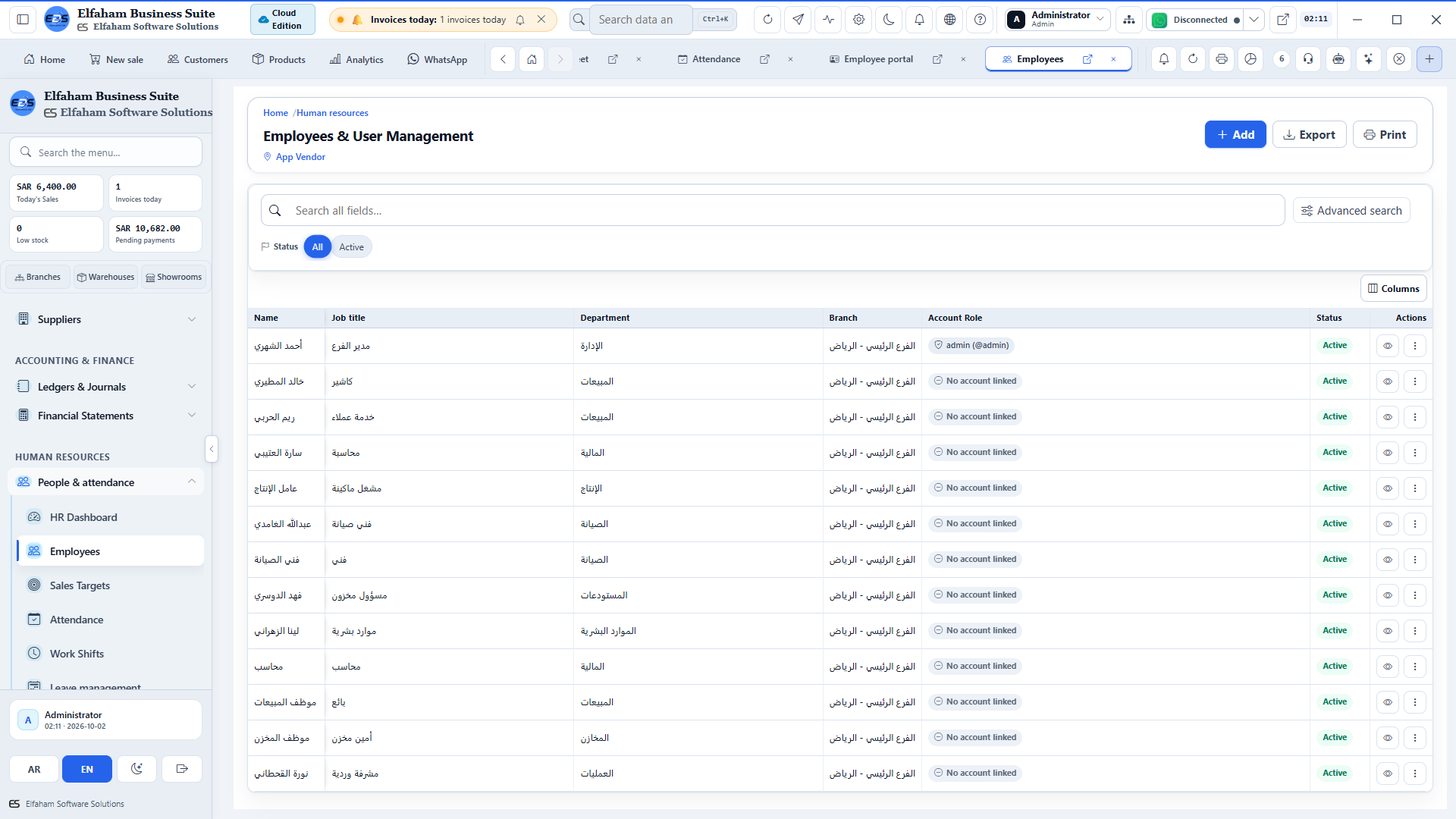
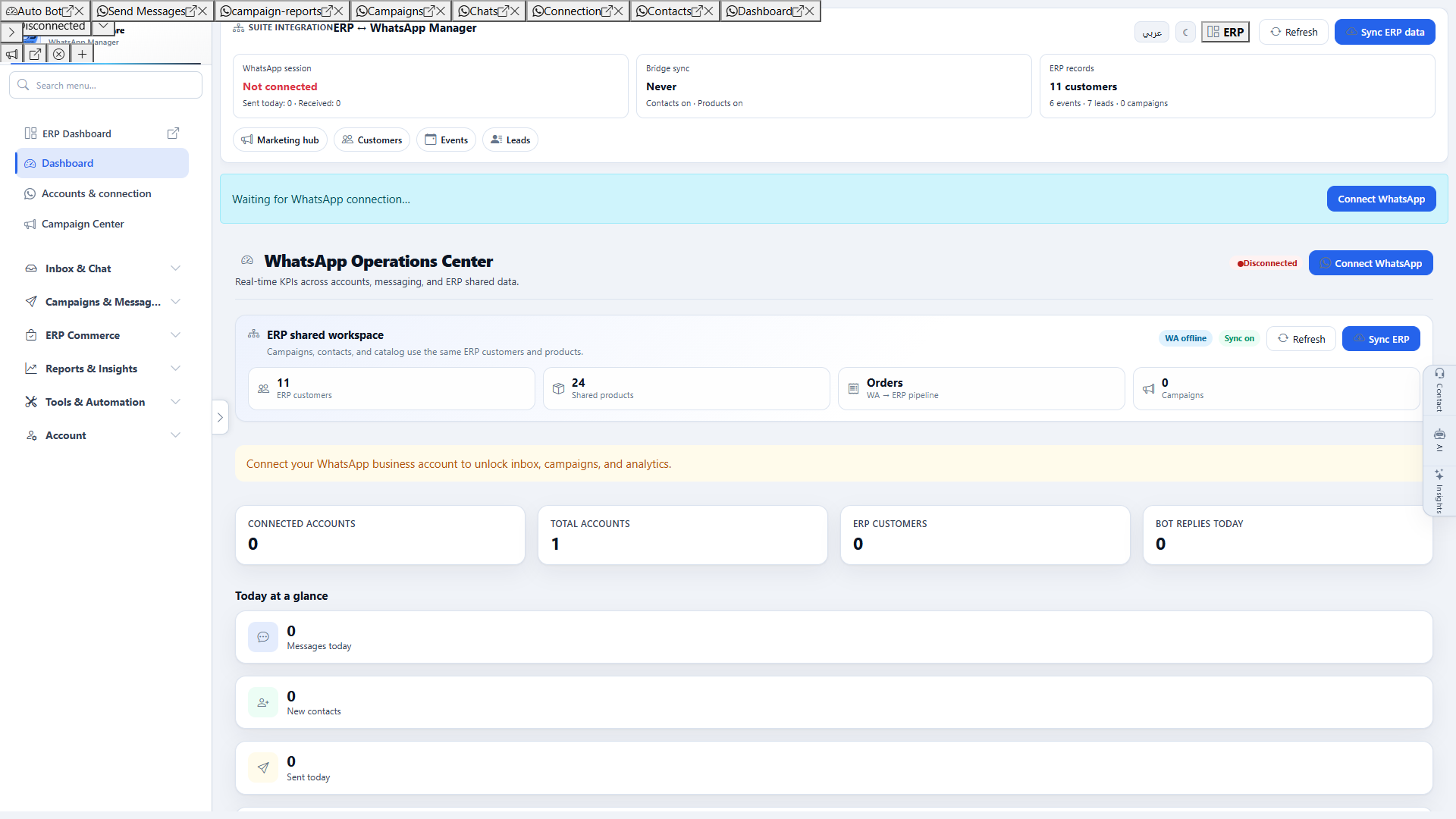
Unified Enterprise Cloud Topology
PC Desktop App
POS + Hardware + Offline Mode
Mobile App
Field Sales & Live Tracking
Web Browser
Zero-Install Cloud Portal
Telegram Bot
Daily EOD & Instant PDF Reports
WhatsApp Manager
Chats + groups + autobots + broadcasts
Overview
Critical workflows & controls
02 — Video Tour Showcase
Select your surface (Desktop ERP, Native Android Mobile App, or Smartphone Web View), language, and theme to explore real workflows with instant direct HD download.
A comprehensive tour traversing all 146 ERP modules and 25 WhatsApp Manager pages (171 total) in Full HD widescreen.
Auto Dark & Light Theme MatchingProduct tutorial — in-app walkthrough
The walkthrough switches with the page language and site theme (light/dark).
03 — Screenshots
Explore the live application interface in high definition — toggle light/dark modes and Arabic/English UI, and zoom into any screen fullscreen.
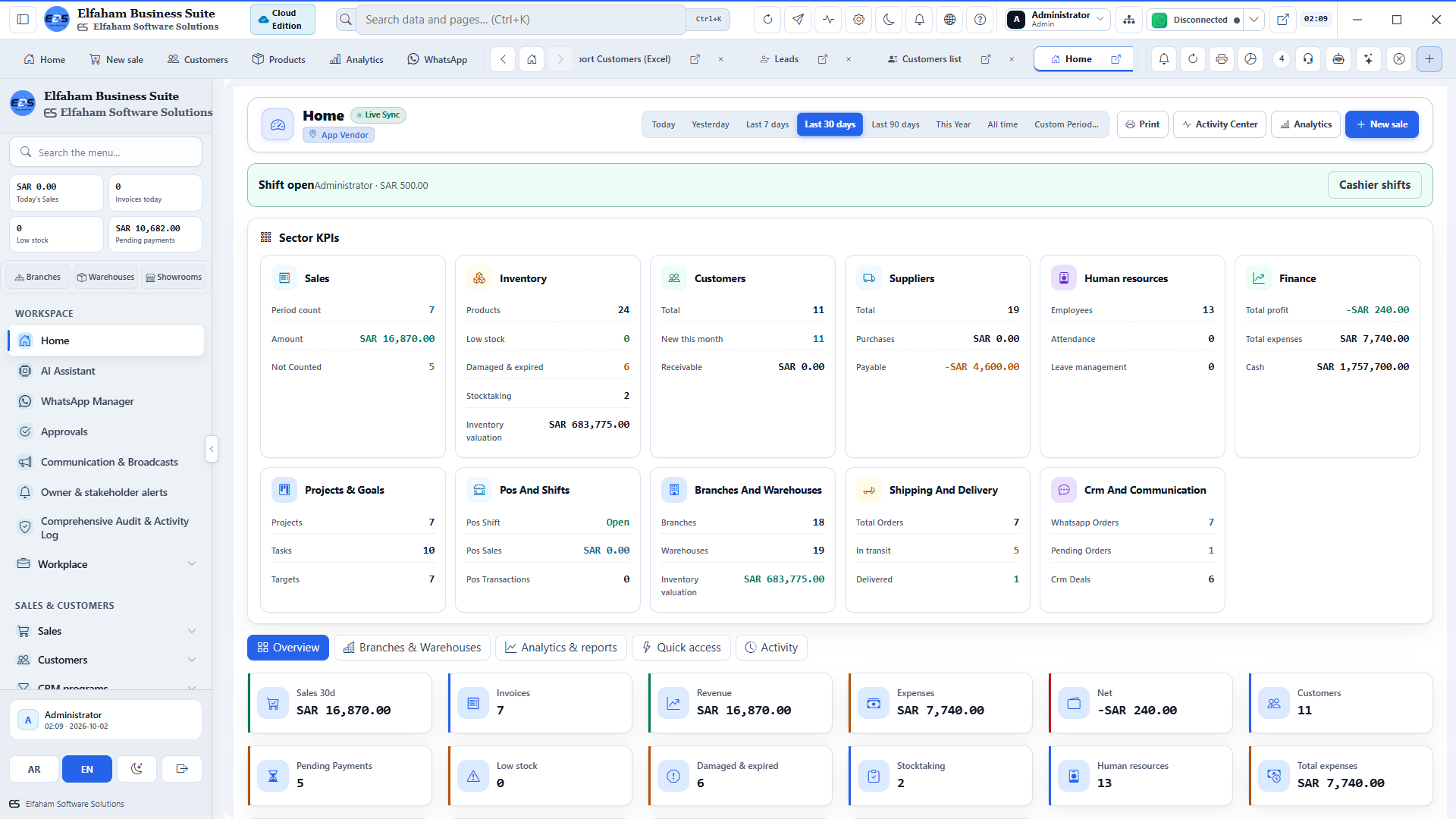
Elfaham Business Suite (ERP, Inventory, Finance & WhatsApp) — Executive Operations Dashboard
Executive Operations Dashboard
live revenue metrics, transaction charts, and KPIs
04 — Modules
One module at a time: title, presentation copy, a real app screenshot, then related screens for that module. Switch light/dark and language, then click any image to open fullscreen.
Group 1
Cloud & Multi-Platform
Mobile Companion App covers live sales, inventory, and approvals on Android & iOS — in one bilingual ERP + WhatsApp desktop suite.
Cloud & Multi-Platform
Web Browser Cloud ERP covers full browser management from any laptop or tablet — in one bilingual ERP + WhatsApp desktop suite.
Cloud & Multi-Platform
Telegram Smart Bot covers automated sales alerts, PDF invoices, and executive summaries — in one bilingual ERP + WhatsApp desktop suite.
Cloud & Multi-Platform
PC Desktop ERP Workstation covers native high-performance Windows desktop client — in one bilingual ERP + WhatsApp desktop suite.
Group 2
POS, Sales & Retail
Start the business day from KPIs, charts, and alerts so sales, stock, and cash are one picture — not five open workbooks.
POS, Sales & Retail
Check out with barcode speed so the counter is a suite till — not a second cash app beside the ERP.
POS, Sales & Retail
Cashier Shifts & Cash Drops covers shift opening, cash floats, drawer drops, and closeout — in one bilingual ERP + WhatsApp desktop suite.
POS, Sales & Retail
Track invoices, returns, and installments so “what does this customer owe?” is answered from the file — not a WhatsApp draft.
POS, Sales & Retail
Sales Returns & Credit Notes covers partial or full returns with automated stock restock — in one bilingual ERP + WhatsApp desktop suite.
POS, Sales & Retail
Daily Sales Performance covers cashier reconciliations, margin analysis, and hourly velocity — in one bilingual ERP + WhatsApp desktop suite.
POS, Sales & Retail
Bulk Sales Import covers migrate historical invoices and batch receipts from CSV/Excel — in one bilingual ERP + WhatsApp desktop suite.
POS, Sales & Retail
Recurring Client Subscriptions covers automated recurring billing and renewal schedules — in one bilingual ERP + WhatsApp desktop suite.
POS, Sales & Retail
Membership Plans & Passes covers customer tiers, visit allotments, and access passes — in one bilingual ERP + WhatsApp desktop suite.
POS, Sales & Retail
Equipment & Asset Rentals covers rental contracts, security deposits, and return check-in — in one bilingual ERP + WhatsApp desktop suite.
POS, Sales & Retail
Loyalty & Points Engine covers reward programs, tier accumulation, and checkout redemption — in one bilingual ERP + WhatsApp desktop suite.
POS, Sales & Retail
Keep categories, barcodes, and prices in one catalog so POS, invoices, and warehouses sell the same item.
POS, Sales & Retail
Rapid Product Creation covers instant SKU generation, color/size variants, and cost rules — in one bilingual ERP + WhatsApp desktop suite.
POS, Sales & Retail
Multi-Level Categories covers hierarchical taxonomy for department and item grouping — in one bilingual ERP + WhatsApp desktop suite.
POS, Sales & Retail
Brands & Manufacturers covers vendor brand registry, trademarks, and origin tracking — in one bilingual ERP + WhatsApp desktop suite.
POS, Sales & Retail
Barcode Registry covers multi-barcode mapping per SKU (retail, pack, carton) — in one bilingual ERP + WhatsApp desktop suite.
POS, Sales & Retail
Batch Barcode Printing covers thermal roll and A4 sheet printing with price tags — in one bilingual ERP + WhatsApp desktop suite.
POS, Sales & Retail
Tiered Pricing & Rules covers customer tier pricing, wholesale rules, and volume promos — in one bilingual ERP + WhatsApp desktop suite.
POS, Sales & Retail
Reorder Alerts covers automated low-stock warnings and minimum replenishment thresholds — in one bilingual ERP + WhatsApp desktop suite.
POS, Sales & Retail
Dispatch & Delivery Tracking covers order fulfillment, courier dispatch, and signature proof — in one bilingual ERP + WhatsApp desktop suite.
POS, Sales & Retail
Invoicing Audit & Archive covers sales invoice register, tax breakdowns, and payment status — in one bilingual ERP + WhatsApp desktop suite.
POS, Sales & Retail
Sales Order Velocity covers open orders, fulfillment cycle times, and pending backorders — in one bilingual ERP + WhatsApp desktop suite.
POS, Sales & Retail
Sales Returns Breakdown covers return reasons, customer return ratios, and restocking — in one bilingual ERP + WhatsApp desktop suite.
Group 3
Warehousing & Inventory Control
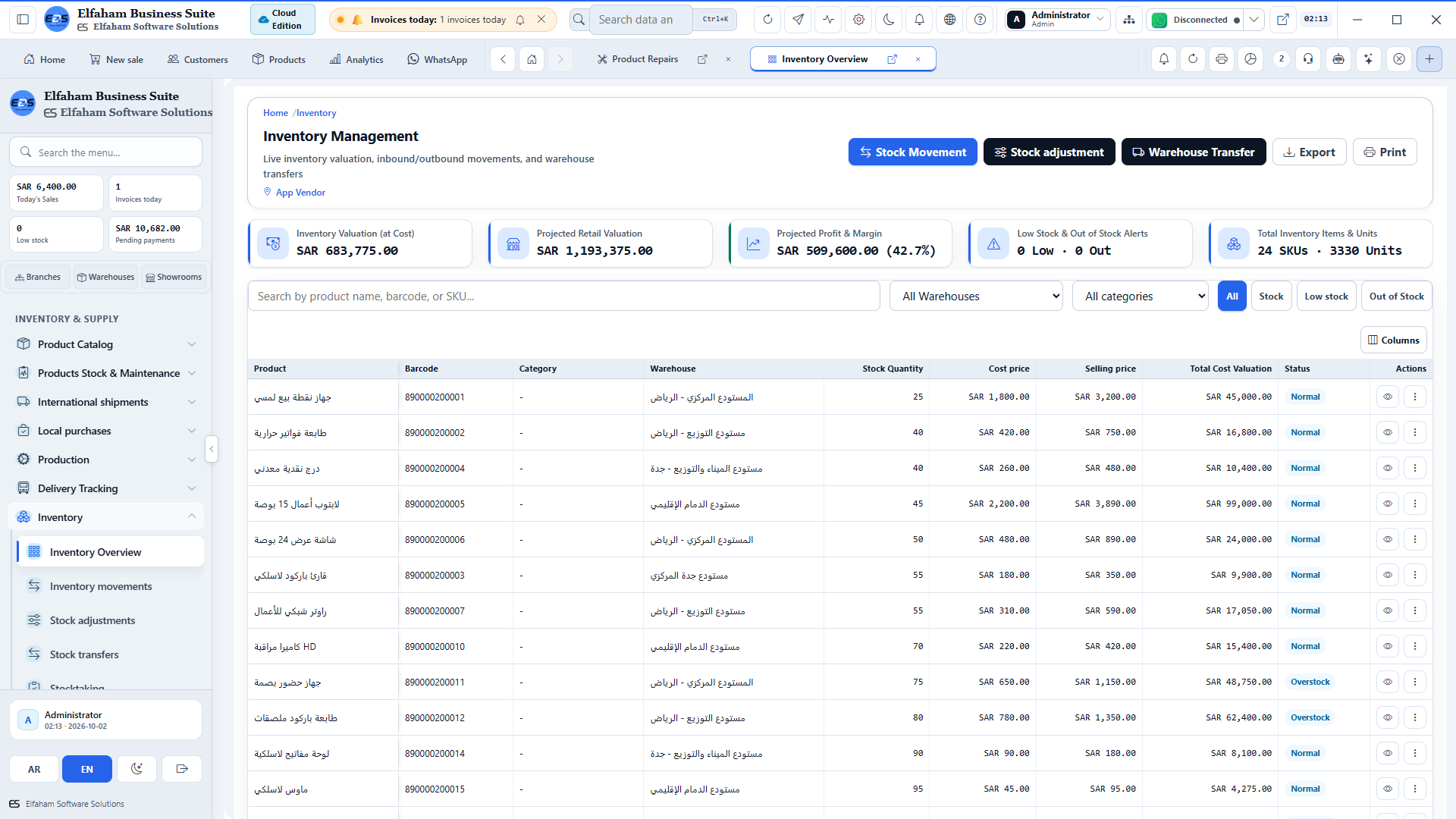
Watch warehouses and stock alerts so a stockout is a system warning — not a surprise at the counter.
Related screens
Warehousing & Inventory Control
Warehouse & Bin Location Setup covers multi-level zones, aisles, racks, and bins — in one bilingual ERP + WhatsApp desktop suite.
Warehousing & Inventory Control
Live Stock Balances covers stock valuation, weighted average cost, and reorder levels — in one bilingual ERP + WhatsApp desktop suite.
Warehousing & Inventory Control
Physical Stocktaking covers barcode cycle counts, variance calculation, and adjustments — in one bilingual ERP + WhatsApp desktop suite.
Warehousing & Inventory Control
Stock Transfer Orders covers inter-warehouse requests, dispatch, transit, and receipt — in one bilingual ERP + WhatsApp desktop suite.
Warehousing & Inventory Control
Inter-Warehouse Freight covers logistics tracking, carrier assignment, and receipt sign-off — in one bilingual ERP + WhatsApp desktop suite.
Warehousing & Inventory Control
Cross-Branch Stock Visibility covers live lookup of items across every regional branch — in one bilingual ERP + WhatsApp desktop suite.
Warehousing & Inventory Control
Stock Adjustments covers write-offs, surplus adjustments, and cost corrections — in one bilingual ERP + WhatsApp desktop suite.
Warehousing & Inventory Control
Damaged & Expired Goods covers quarantine log, disposal approvals, and loss reports — in one bilingual ERP + WhatsApp desktop suite.
Warehousing & Inventory Control
Repair & Maintenance Depot covers RMA tracking, refurbished stock, and workshop orders — in one bilingual ERP + WhatsApp desktop suite.
Warehousing & Inventory Control
Serial & Warranty Tracker covers individual serial number tracking with warranty dates — in one bilingual ERP + WhatsApp desktop suite.
Warehousing & Inventory Control
Batch & Lot Management covers expiration date monitoring and FIFO dispatch control — in one bilingual ERP + WhatsApp desktop suite.
Warehousing & Inventory Control
Custom Barcode & Label Designer covers custom print templates, QR codes, and shelf labels — in one bilingual ERP + WhatsApp desktop suite.
Warehousing & Inventory Control
Central Product Database covers master SKU registry, specifications, and multi-unit barcoding — in one bilingual ERP + WhatsApp desktop suite.
Warehousing & Inventory Control
Inventory Shrinkage & Scrap covers damaged goods loss valuation and root-cause waste — in one bilingual ERP + WhatsApp desktop suite.
Warehousing & Inventory Control
Product Movement & Turnover covers fast vs slow moving items, ABC analysis, and margin — in one bilingual ERP + WhatsApp desktop suite.
Group 4
Procurement & Vendor Logistics
Receive supplier bills into stock so buying is a disciplined business process — not a chat thread with a vendor.
Procurement & Vendor Logistics
Purchase Order Creation covers structured procurement requisitions and approvals — in one bilingual ERP + WhatsApp desktop suite.
Procurement & Vendor Logistics
Purchase Returns covers debit notes, supplier claims, and outbound stock adjustment — in one bilingual ERP + WhatsApp desktop suite.
Procurement & Vendor Logistics
Supplier Disbursements covers partial payments, payment vouchers, and dues ledger — in one bilingual ERP + WhatsApp desktop suite.
Procurement & Vendor Logistics
Inbound Receiving & Inspection covers quality check, barcode verification, and stocking — in one bilingual ERP + WhatsApp desktop suite.
Procurement & Vendor Logistics
Vendor Catalog & Pricing covers supplier price lists, lead times, and rating scorecards — in one bilingual ERP + WhatsApp desktop suite.
Procurement & Vendor Logistics
Keep vendor directory and payments next to purchases so paying a supplier is a file — not a remembered IBAN in chat.
Procurement & Vendor Logistics
Vendor Onboarding covers commercial register, tax identification, and payment terms — in one bilingual ERP + WhatsApp desktop suite.
Procurement & Vendor Logistics
Local Sourcing & Petty Cash Buys covers immediate cash purchases and local vendor receipts — in one bilingual ERP + WhatsApp desktop suite.
Procurement & Vendor Logistics
Vendor Payment Schedules covers aging payable invoices and disbursement tracking — in one bilingual ERP + WhatsApp desktop suite.
Procurement & Vendor Logistics
Shipments & Inbound Containers covers customs clearance, container tracking, and freight — in one bilingual ERP + WhatsApp desktop suite.
Procurement & Vendor Logistics
Freight Manifest Creation covers bill of lading, shipping line, and duty allocation — in one bilingual ERP + WhatsApp desktop suite.
Procurement & Vendor Logistics
Purchase Requisitions & Orders covers procurement workflow from requisition to approved order — in one bilingual ERP + WhatsApp desktop suite.
Procurement & Vendor Logistics
Freight & Shipment Tracking covers in-transit shipments, customs clearance, and landed costs — in one bilingual ERP + WhatsApp desktop suite.
Procurement & Vendor Logistics
Supplier Payment Ledger covers settlement history, open disbursements, and payables — in one bilingual ERP + WhatsApp desktop suite.
Procurement & Vendor Logistics
Vendor Performance & Volume covers purchasing volume by supplier, on-time delivery, and SLA — in one bilingual ERP + WhatsApp desktop suite.
Procurement & Vendor Logistics
Warehouse Shipment Intake covers GRN receiving, quantity verification, and stock entry — in one bilingual ERP + WhatsApp desktop suite.
Procurement & Vendor Logistics
Freight & Logistics Disbursements covers shipping invoices, customs duty, and freight fees — in one bilingual ERP + WhatsApp desktop suite.
Procurement & Vendor Logistics
Vendor Return Shipments covers defective goods dispatch, return gate passes, and credit memos — in one bilingual ERP + WhatsApp desktop suite.
Group 5
Finance, Accounting & General Ledger
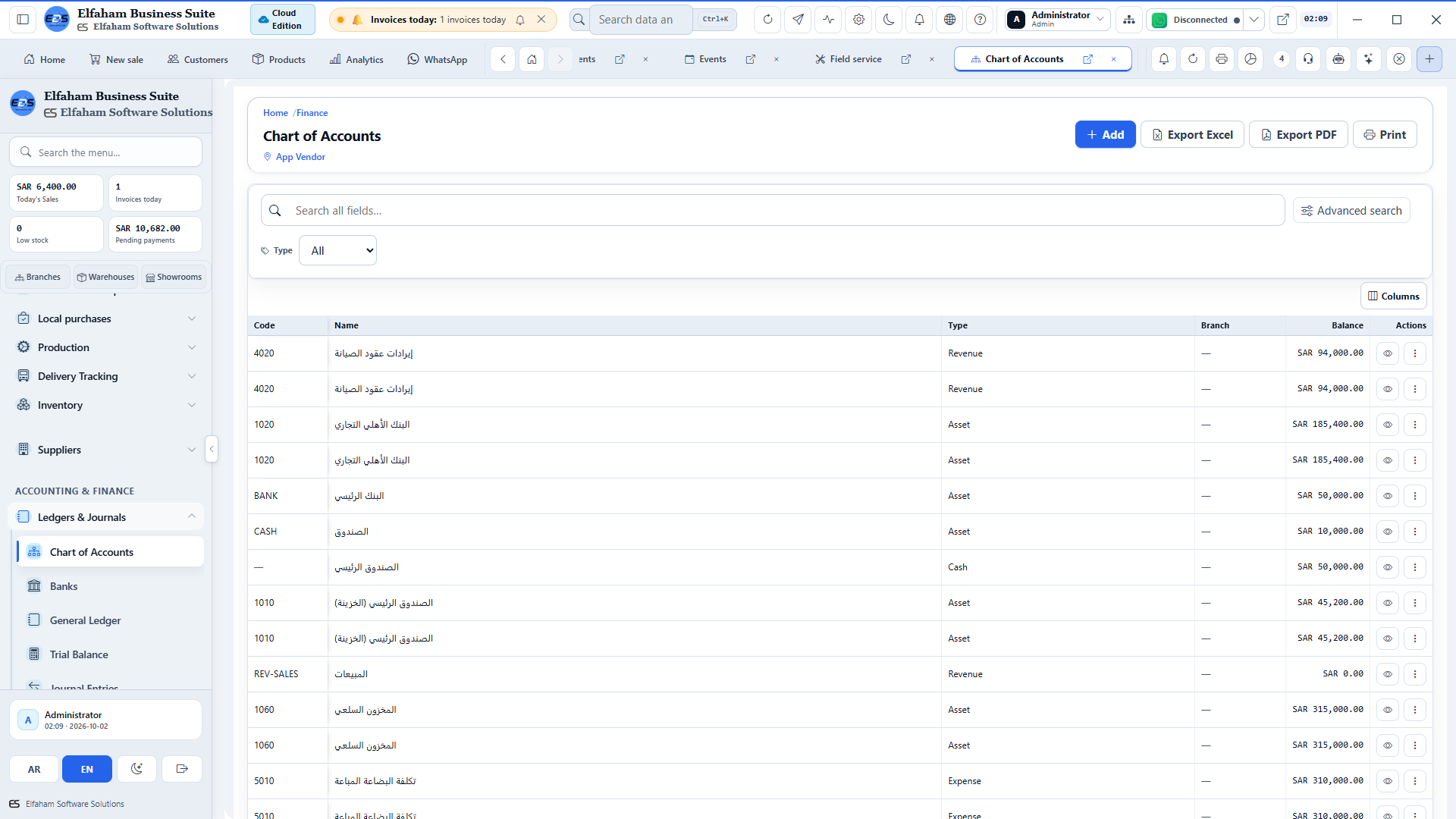
Run accounts, cash flow, and ledgers in the same suite as invoices so the owner sees money movement without waiting for month-end Excel.
Finance, Accounting & General Ledger
General Ledger & Journal Entries covers debit/credit journal vouchers and transaction log — in one bilingual ERP + WhatsApp desktop suite.
Finance, Accounting & General Ledger
Real-Time Trial Balance covers opening balances, movement totals, and ending balances — in one bilingual ERP + WhatsApp desktop suite.
Finance, Accounting & General Ledger
Statement of Financial Position covers assets, liabilities, and equity balance sheet — in one bilingual ERP + WhatsApp desktop suite.
Finance, Accounting & General Ledger
Income Statement (P&L) covers revenue breakdown, direct costs, and net operating profit — in one bilingual ERP + WhatsApp desktop suite.
Finance, Accounting & General Ledger
Cash Flow Statement covers operating, investing, and financing cash stream analytics — in one bilingual ERP + WhatsApp desktop suite.
Finance, Accounting & General Ledger
Cash Safes & Bank Accounts covers cash registers, bank reconciliations, and internal transfers — in one bilingual ERP + WhatsApp desktop suite.
Finance, Accounting & General Ledger
Cheques Portfolio covers received and issued cheques, collection cycles, and maturity alerts — in one bilingual ERP + WhatsApp desktop suite.
Finance, Accounting & General Ledger
Payment & Receipt Vouchers covers structured cash vouchers with auto-posting to ledger — in one bilingual ERP + WhatsApp desktop suite.
Finance, Accounting & General Ledger
Bank Statement Reconciliations covers matching bank records with system transactions — in one bilingual ERP + WhatsApp desktop suite.
Finance, Accounting & General Ledger
Cost Center Allocation covers allocate project and branch expenses to specific centers — in one bilingual ERP + WhatsApp desktop suite.
Finance, Accounting & General Ledger
Multi-Currency Management covers real-time exchange rate tables and forex gain/loss — in one bilingual ERP + WhatsApp desktop suite.
Finance, Accounting & General Ledger
Categorize operating costs so spending is a ledger line — not a folder of receipts in a drawer.
Finance, Accounting & General Ledger
Expense Categorization covers hierarchical expense types and budget allocation — in one bilingual ERP + WhatsApp desktop suite.
Finance, Accounting & General Ledger
Staff Expense Claims covers employee reimbursement requests, receipt upload, and approvals — in one bilingual ERP + WhatsApp desktop suite.
Finance, Accounting & General Ledger
Installment Plans & Schedules covers customer installment tracking, due dates, and reminders — in one bilingual ERP + WhatsApp desktop suite.
Finance, Accounting & General Ledger
Accounting Operations Master Hub covers unified financial health, journals, and compliance — in one bilingual ERP + WhatsApp desktop suite.
Finance, Accounting & General Ledger
Corporate Budgets covers departmental allocations, spending caps, and threshold alarms — in one bilingual ERP + WhatsApp desktop suite.
Finance, Accounting & General Ledger
Budget vs Actual Variance covers real-time variance analysis and financial guardrails — in one bilingual ERP + WhatsApp desktop suite.
Finance, Accounting & General Ledger
Recurring Journal Entries covers automated periodic depreciation, rent, and accruals — in one bilingual ERP + WhatsApp desktop suite.
Finance, Accounting & General Ledger
Fiscal Periods & Year-End Closing covers accounting period locking and financial year closeout — in one bilingual ERP + WhatsApp desktop suite.
Finance, Accounting & General Ledger
Cheque Portfolio Analytics covers issued and received cheques, maturities, and clearing — in one bilingual ERP + WhatsApp desktop suite.
Finance, Accounting & General Ledger
Receivables & Aging Analysis covers customer credit limits, aging brackets, and collections — in one bilingual ERP + WhatsApp desktop suite.
Finance, Accounting & General Ledger
Financial Journal Audit covers ledger postings, journal entry logs, and debits/credits balance — in one bilingual ERP + WhatsApp desktop suite.
Group 6
Human Resources, Payroll & Biometrics
Workforce Intelligence Dashboard covers headcount, active shifts, leave, and payroll metrics — in one bilingual ERP + WhatsApp desktop suite.
Human Resources, Payroll & Biometrics
Keep employees and attendance in the same system that already runs payroll — one staff picture for the owner.
Human Resources, Payroll & Biometrics
Attendance & Time Tracking covers daily check-in/out, late arrivals, and overtime hours — in one bilingual ERP + WhatsApp desktop suite.
Related screens
Human Resources, Payroll & Biometrics
Biometric Hardware Sync covers direct integration with ZKTeco and IP biometric devices — in one bilingual ERP + WhatsApp desktop suite.
Human Resources, Payroll & Biometrics
Shift Rosters & Rotations covers flexible multi-shift scheduling and rotation calendars — in one bilingual ERP + WhatsApp desktop suite.
Human Resources, Payroll & Biometrics
Leave & Absence Management covers vacation requests, sick leaves, and balance calculations — in one bilingual ERP + WhatsApp desktop suite.
Human Resources, Payroll & Biometrics
Organizational Hierarchy covers departments, reporting lines, and job descriptions — in one bilingual ERP + WhatsApp desktop suite.
Human Resources, Payroll & Biometrics
Run salary cycles with approvals so payday is a suite process — not a spreadsheet emailed the night before.
Related screens
Human Resources, Payroll & Biometrics
Payroll Processing Run covers automated monthly payroll batch generation and bank slips — in one bilingual ERP + WhatsApp desktop suite.
Human Resources, Payroll & Biometrics
Salary Structures & Allowances covers housing, transport, meal allowances, and bonus rules — in one bilingual ERP + WhatsApp desktop suite.
Human Resources, Payroll & Biometrics
KPI Targets & Commissions covers sales commission tiers and target achievement bonuses — in one bilingual ERP + WhatsApp desktop suite.
Human Resources, Payroll & Biometrics
Time-Off Permissions & Excuses covers short leave slips and hourly permission tracking — in one bilingual ERP + WhatsApp desktop suite.
Human Resources, Payroll & Biometrics
Recruitment & Job Openings covers applicant tracking system, interview stages, and offers — in one bilingual ERP + WhatsApp desktop suite.
Human Resources, Payroll & Biometrics
Performance Appraisals covers periodic employee evaluations and 360 review scorecards — in one bilingual ERP + WhatsApp desktop suite.
Human Resources, Payroll & Biometrics
Official Holidays & Calendars covers national holidays, paid company leaves, and calendars — in one bilingual ERP + WhatsApp desktop suite.
Human Resources, Payroll & Biometrics
Employee Self-Service Portal covers personal attendance clock-in, leave balances, and requests — in one bilingual ERP + WhatsApp desktop suite.
Human Resources, Payroll & Biometrics
Payroll Master Engine covers automatic salary calculations, allowances, and deductions — in one bilingual ERP + WhatsApp desktop suite.
Human Resources, Payroll & Biometrics
Workforce Demographics & Turnover covers employee headcount, department allocations, and tenure — in one bilingual ERP + WhatsApp desktop suite.
Human Resources, Payroll & Biometrics
KPI & Commission Targets covers sales quotas, department goals, and performance tiers — in one bilingual ERP + WhatsApp desktop suite.
Human Resources, Payroll & Biometrics
Personal Performance Goals covers agent sales target tracking, achieved percentage, and payout — in one bilingual ERP + WhatsApp desktop suite.
Human Resources, Payroll & Biometrics
Team Target Leaderboard covers departmental goal achievement rankings and progress charts — in one bilingual ERP + WhatsApp desktop suite.
Group 7
Customer Relationship Management (CRM)
Hold CRM, credits, and contacts in one database so a customer is a central institutional record — not a private phone list.
Customer Relationship Management (CRM)
Sales Leads & Opportunities covers inbound leads, sales pipeline, and follow-up activities — in one bilingual ERP + WhatsApp desktop suite.
Customer Relationship Management (CRM)
Visual CRM Pipeline covers drag-and-drop opportunity stages from prospect to closing — in one bilingual ERP + WhatsApp desktop suite.
Customer Relationship Management (CRM)
Credit Limits & Balances covers credit limit enforcement and overdue balance alerts — in one bilingual ERP + WhatsApp desktop suite.
Customer Relationship Management (CRM)
Customer Tiers & Segments covers VIP, wholesale, retail, and corporate segmentation — in one bilingual ERP + WhatsApp desktop suite.
Customer Relationship Management (CRM)
Customer Data Migration covers import contacts, opening balances, and addresses from Excel — in one bilingual ERP + WhatsApp desktop suite.
Customer Relationship Management (CRM)
Contracts & SLA Agreements covers formal service agreements, terms, and auto-renewal — in one bilingual ERP + WhatsApp desktop suite.
Customer Relationship Management (CRM)
Customer Account Statements covers detailed transaction history, running balance, and SOA — in one bilingual ERP + WhatsApp desktop suite.
Group 8
WhatsApp Hub & Smart Messaging
Send ERP invoices on WhatsApp so the customer gets the official document directly — not a photo of a printout.
WhatsApp Hub & Smart Messaging
See connection status and owner alerts so WhatsApp is an official business channel — not a phone that went offline overnight.
WhatsApp Hub & Smart Messaging
Handle customer messaging in the suite so the thread is a central business file — not a private chat on one salesperson’s phone.
WhatsApp Hub & Smart Messaging
Link the session with a QR so your business number lives on the desktop suite — not on whoever scanned last.
WhatsApp Hub & Smart Messaging
Instant WhatsApp Broadcasts covers real-time broadcast to select customer segments — in one bilingual ERP + WhatsApp desktop suite.
WhatsApp Hub & Smart Messaging
Send text, images, and files in bulk so a campaign is a suite job — not copy-paste into a hundred chats.
WhatsApp Hub & Smart Messaging
Schedule templates so marketing is a calendar in the suite — not a reminder on someone’s personal phone.
WhatsApp Hub & Smart Messaging
Reuse WhatsApp content so replies stay on-brand — not rewritten from scratch in every chat.
WhatsApp Hub & Smart Messaging
Set rules and an AI assistant so after-hours questions get an immediate official answer — not silence until morning.
WhatsApp Hub & Smart Messaging
Capture orders from chat and sync them to ERP so a WhatsApp sale is an invoice — not a screenshot in a group.
WhatsApp Hub & Smart Messaging
Order Workflow Configuration covers auto-invoicing, status replies, and delivery updates — in one bilingual ERP + WhatsApp desktop suite.
WhatsApp Hub & Smart Messaging
WhatsApp Commerce Analytics covers conversational order conversions, revenues, and bot orders — in one bilingual ERP + WhatsApp desktop suite.
WhatsApp Hub & Smart Messaging
Targeted Audience Lists covers segment contacts by purchase history and import CSV files — in one bilingual ERP + WhatsApp desktop suite.
WhatsApp Hub & Smart Messaging
Customer Chat Intelligence covers sentiment scoring, customer engagement, and purchase intent — in one bilingual ERP + WhatsApp desktop suite.
WhatsApp Hub & Smart Messaging
WhatsApp Gateway Health covers socket latency, message throughput, and webhook monitors — in one bilingual ERP + WhatsApp desktop suite.
WhatsApp Hub & Smart Messaging
Group Contact Extractor covers extract active group participants and prospective leads — in one bilingual ERP + WhatsApp desktop suite.
WhatsApp Hub & Smart Messaging
WhatsApp Communities & Groups covers scheduled broadcasts and group interaction tools — in one bilingual ERP + WhatsApp desktop suite.
WhatsApp Hub & Smart Messaging
Live Agent Chat Routing covers omnichannel inbox, agent assignment, and warm transfer — in one bilingual ERP + WhatsApp desktop suite.
WhatsApp Hub & Smart Messaging
Automated Transactional Alerts covers order confirmation, invoice PDF dispatch, and tracking — in one bilingual ERP + WhatsApp desktop suite.
WhatsApp Hub & Smart Messaging
WhatsApp Interactive Catalog covers direct product browsing, cart building, and checkout — in one bilingual ERP + WhatsApp desktop suite.
WhatsApp Hub & Smart Messaging
Broadcast Delivery & Open Rates covers message delivery analytics, read confirmations, and ROI — in one bilingual ERP + WhatsApp desktop suite.
WhatsApp Hub & Smart Messaging
WhatsApp Self-Service Returns covers automated return requests and RMA initiation in chat — in one bilingual ERP + WhatsApp desktop suite.
WhatsApp Hub & Smart Messaging
WhatsApp Gateway Quotas covers message bandwidth, active sessions, and gateway limits — in one bilingual ERP + WhatsApp desktop suite.
WhatsApp Hub & Smart Messaging
Marketing Automation Toolkit covers link shortener, click-to-chat QR, and lead magnets — in one bilingual ERP + WhatsApp desktop suite.
WhatsApp Hub & Smart Messaging
Visual Customer Journeys covers automated drip sequences, cart abandonment, and follow-ups — in one bilingual ERP + WhatsApp desktop suite.
Group 9
Manufacturing & Production Runs
Track orders and BOM so manufacturing is in the same suite as stock — not a whiteboard the warehouse cannot see.
Manufacturing & Production Runs
Bill of Materials (BOM) & Recipes covers multi-level component formulas and standard costs — in one bilingual ERP + WhatsApp desktop suite.
Manufacturing & Production Runs
Raw Materials Requisitions covers stock withdrawal from warehouse for shop floor assembly — in one bilingual ERP + WhatsApp desktop suite.
Manufacturing & Production Runs
Shop Floor Work Orders covers daily operator tasks, workstation queues, and shift output — in one bilingual ERP + WhatsApp desktop suite.
Manufacturing & Production Runs
Real-Time Production Tracking covers progress stages, scrap counting, and cycle times — in one bilingual ERP + WhatsApp desktop suite.
Manufacturing & Production Runs
Manufacturing Cost Allocation covers direct labor, raw materials, and overhead costing — in one bilingual ERP + WhatsApp desktop suite.
Manufacturing & Production Runs
Quality Assurance & Batch Inspection covers defect logging, tolerance testing, and release — in one bilingual ERP + WhatsApp desktop suite.
Manufacturing & Production Runs
Factory Analytics & Yield Reports covers throughput, scrap percentage, and machine yield — in one bilingual ERP + WhatsApp desktop suite.
Manufacturing & Production Runs
Manufacturing Raw Material Procurement covers production purchase orders and goods receipt — in one bilingual ERP + WhatsApp desktop suite.
Manufacturing & Production Runs
Industrial Material Suppliers covers vendor qualification, lead times, and contracts — in one bilingual ERP + WhatsApp desktop suite.
Manufacturing & Production Runs
Quality Control & Inspections covers raw material and finished product QA checklists — in one bilingual ERP + WhatsApp desktop suite.
Group 10
Projects, Tasks & Field Service
Assign tasks and workload so delivery work lives on the team list — not in the memory of whoever took the last call.
Projects, Tasks & Field Service
Task Breakdown & Assignments covers task dependencies, priority tags, and deadline tracking — in one bilingual ERP + WhatsApp desktop suite.
Projects, Tasks & Field Service
Field Operations & Dispatch covers dispatching technicians, GPS locations, and job routes — in one bilingual ERP + WhatsApp desktop suite.
Projects, Tasks & Field Service
Field Service Tickets covers on-site maintenance tickets, client sign-off, and spares — in one bilingual ERP + WhatsApp desktop suite.
Projects, Tasks & Field Service
Driver & Delivery Portal covers delivery routes, proof of delivery, and client signatures — in one bilingual ERP + WhatsApp desktop suite.
Projects, Tasks & Field Service
Company Fleet & Vehicles covers vehicle maintenance logs, fuel usage, and registration — in one bilingual ERP + WhatsApp desktop suite.
Projects, Tasks & Field Service
Fixed Asset Registry covers equipment tagging, location assignment, and depreciation — in one bilingual ERP + WhatsApp desktop suite.
Projects, Tasks & Field Service
Preventive & Corrective Maintenance covers equipment service schedules and parts log — in one bilingual ERP + WhatsApp desktop suite.
Projects, Tasks & Field Service
Operations Calendar covers scheduled deliveries, maintenance windows, and company milestones — in one bilingual ERP + WhatsApp desktop suite.
Projects, Tasks & Field Service
Corporate Events & Tasks covers project milestones, team scheduling, and company timelines — in one bilingual ERP + WhatsApp desktop suite.
Projects, Tasks & Field Service
Executive Notes & Collaboration covers team action items, internal memos, and audit notes — in one bilingual ERP + WhatsApp desktop suite.
Projects, Tasks & Field Service
Project Planning & Setup covers budget milestones, deliverable scoping, and team assignment — in one bilingual ERP + WhatsApp desktop suite.
Projects, Tasks & Field Service
Project Task Board covers Kanban task flow, assignment, deadlines, and milestone tracking — in one bilingual ERP + WhatsApp desktop suite.
Group 11
System Administration & Security
Set business profile and preferences once so every printout and screen carries the same business identity.
System Administration & Security
Custom Role Builder covers define granular custom roles with specific feature access — in one bilingual ERP + WhatsApp desktop suite.
System Administration & Security
Granular Permission Matrix covers read, write, edit, delete, export, and approve rights — in one bilingual ERP + WhatsApp desktop suite.
System Administration & Security
User Directory & Role Mapping covers user accounts, password policies, and branch locks — in one bilingual ERP + WhatsApp desktop suite.
System Administration & Security
Active Session Monitor covers view logged-in devices, IP addresses, and remote kill — in one bilingual ERP + WhatsApp desktop suite.
System Administration & Security
Security Audit Trail covers immutable activity log recording all user modifications — in one bilingual ERP + WhatsApp desktop suite.
System Administration & Security
Database Backup & Disaster Recovery covers automated scheduled cloud and local snapshots — in one bilingual ERP + WhatsApp desktop suite.
System Administration & Security
Approvals & Authorizations covers multi-level purchase, leave, and expense sign-offs — in one bilingual ERP + WhatsApp desktop suite.
System Administration & Security
Branch Management covers multi-branch configuration, regional centers, and local settings — in one bilingual ERP + WhatsApp desktop suite.
System Administration & Security
Document Management Center covers centralized digital repository, company files, and archive — in one bilingual ERP + WhatsApp desktop suite.
System Administration & Security
Knowledge Base & SOPs covers operational manuals, standard operating procedures, and guides — in one bilingual ERP + WhatsApp desktop suite.
Group 12
Executive Analytics & BI Reporting
Export Excel when you need a decision — not when someone finishes rebuilding the week in a spreadsheet.
Executive Analytics & BI Reporting
Profitability & Margin Analysis covers gross and net profit by branch, category, and SKU — in one bilingual ERP + WhatsApp desktop suite.
Executive Analytics & BI Reporting
Financial Statements & Ledgers covers consolidated balance sheets and financial health — in one bilingual ERP + WhatsApp desktop suite.
Executive Analytics & BI Reporting
Cash Flow Trends & Forecasts covers liquidity projections and cash inflow/outflow curves — in one bilingual ERP + WhatsApp desktop suite.
Executive Analytics & BI Reporting
Inventory Valuation & Turnover covers inventory velocity, holding costs, and dead stock — in one bilingual ERP + WhatsApp desktop suite.
Executive Analytics & BI Reporting
Stock Movement Audit covers track all receiving, transfers, write-offs, and sales — in one bilingual ERP + WhatsApp desktop suite.
Executive Analytics & BI Reporting
Customer Value & Retention covers customer lifetime value (LTV) and purchasing frequency — in one bilingual ERP + WhatsApp desktop suite.
Executive Analytics & BI Reporting
Tax Return & VAT Reports covers tax liability breakdown and electronic invoice audit — in one bilingual ERP + WhatsApp desktop suite.
Executive Analytics & BI Reporting
Payroll & Compensation Reports covers departmental wage breakdown and annual payroll cost — in one bilingual ERP + WhatsApp desktop suite.
Executive Analytics & BI Reporting
Manufacturing & Factory Yield covers output efficiency, material waste, and machine hours — in one bilingual ERP + WhatsApp desktop suite.
Executive Analytics & BI Reporting
Executive Stakeholder Summary covers daily executive email & Telegram dispatch to owners — in one bilingual ERP + WhatsApp desktop suite.
Executive Analytics & BI Reporting
Ask for help in the module you are already in so staff get context — not a generic chatbot that does not know your invoices.
05 — Solutions
Desktop + mobile on your premises. Cloud/VPS links devices and licenses only — ERP data stays on the licensed PC.
Insight 01
On the floor today
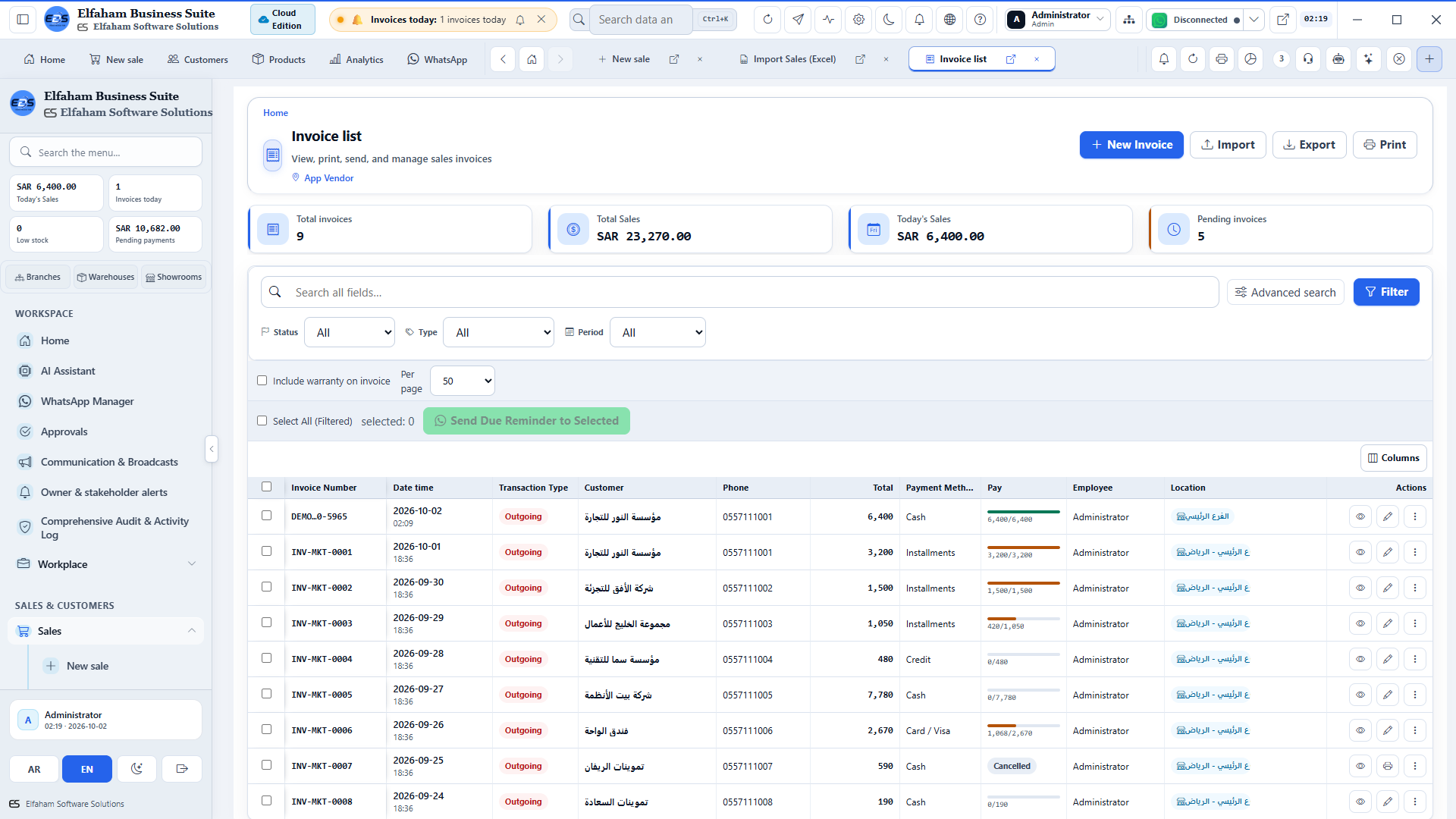
Sales close in one app. Stock lives in a sheet. Nobody can answer “can we ship this?” from a single screen.
The module that does it
Sales invoices, returns, POS checkout, purchases, and warehouse levels share one catalog so AR and stock move together.
Insight 02
On the floor today
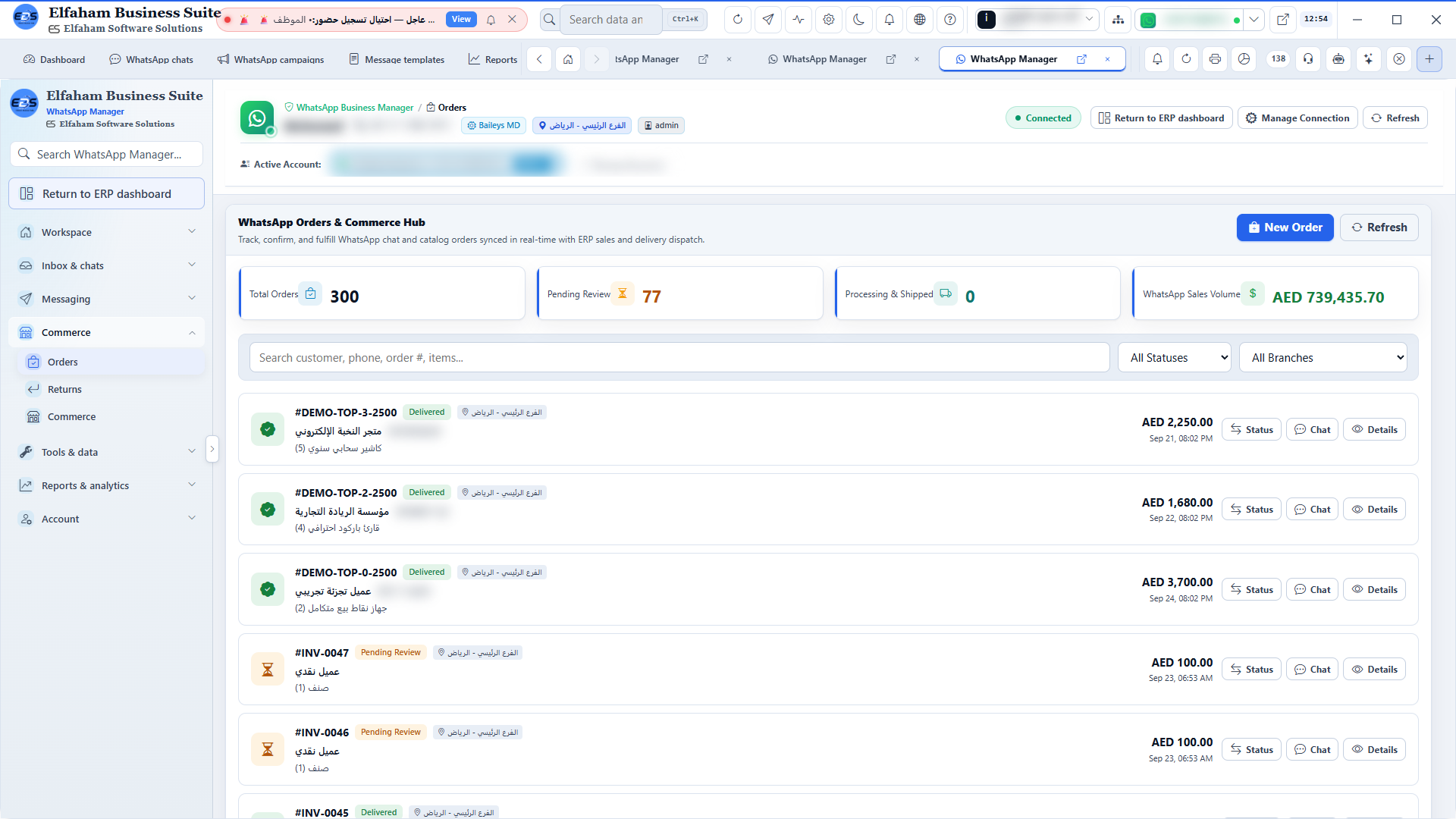
A sale in chat is a screenshot in a group. It never becomes stock movement or an invoice the accountant can post.
The module that does it
WhatsApp orders capture from chat and sync into suite sales. Campaigns and the inbox sit on the same customer who already has credits and invoices.
Insight 03
On the floor today
Finance is “tomorrow’s reporting problem.” Payroll is a spreadsheet emailed the night before payday.
The module that does it
Accounts, cash flow, and ledgers sit next to HR attendance and salary runs — day-to-day control, not a month-end reconstruction.
Insight 04
On the floor today
Five cloud tools go dark when the internet drops. The owner still needs today’s sales, stock alerts, and cash.
The module that does it
The Windows suite keeps operating locally. The dashboard shows KPIs, charts, and alerts for sales, stock, and cash without waiting on a browser tab.
06 — Capabilities
What the system delivers for desk, sales, and comms — grouped by work area.
Group 1
Broadcast campaigns, offers & automated follow-ups
Shift closing summaries, revenue recaps & PDF vouchers
08 — Downloads & Setup
Download the application, documentation, and product resources.
v2.1.14 · Windows 10 / 11 (64-bit) · 185.6 MB
Standard Windows setup installer (NSIS) with desktop & start menu shortcuts, automatic prerequisites, and clean uninstaller.
Elfaham-Business-Suite-2.1.14-Setup.exe
Elfaham-Mobile-Suite-2.1.17.apk · 14.4 MiB · Android
Native Android APK for business owners and supervisors to track sales transactions, multi-branch stock levels, and order approvals on the fly.
PDF · 19-20 MB · 153 Pages
Step-by-step illustrated reference covering all 44 operational modules across the entire system.
PDF · 15 MB · Executive Summary
Executive deck highlighting business value, operational features, and pricing model.
One license per branch with dedicated support, ongoing updates, and instant activation.
| Version | Platform | Size | Date | |
|---|---|---|---|---|
| 2.1.21Latest | android | 15117925 | 2026-10-14 | Download |
| 2.1.20 | android | 15117925 | 2026-10-14 | Download |
| 2.1.19 | android | 15113829 | 2026-10-14 | Download |
| 2.1.18 | android | 15113829 | 2026-10-14 | Download |
| 2.1.17 | android | 15113829 | 2026-10-13 | Download |
| 2.1.16 | android | 15113829 | 2026-10-13 | Download |
| 2.1.15 | android | 15109733 | 2026-10-13 | Download |
| 2.1.14 | android | 15109733 | 2026-10-13 | Download |
| 2.1.14Latest | windows | 192248300 | 2026-10-13 | Download |
| 2.1.13 | windows | 404720034 | 2026-10-11 | Download |
| 2.1.12 | windows | 192552427 | 2026-10-10 | Download |
| 2.1.12 | android | 15089253 | 2026-10-10 | Download |
| 2.1.11 | windows | 193269448 | 2026-10-10 | Download |
| 2.1.10Latest | web | — | 2026-10-09 | Download |
| 2.1.10 | android | 15064677 | 2026-10-09 | Download |
| 2.1.10 | windows | 191883146 | 2026-10-09 | Download |
| 2.1.9 | windows | 194609747 bytes | 2026-10-08 | Download |
| 2.1.7 | android | 15060581 | 2026-10-07 | Download |
| 2.1.8 | windows | 194527986 | 2026-10-06 | Download |
| 2.1.7 | windows | 191289950 | 2026-10-06 | Download |
| 2.1.6 | windows | 191270364 | 2026-10-06 | Download |
| 2.1.5-web | web | — | 2026-10-06 | Download |
| 2.1.5 | android | 15060581 | 2026-10-06 | Download |
| 2.1.5 | windows | 191269500 | 2026-10-06 | Download |
| 2.0.7 | android | 15062207 | 2026-10-03 | Download |
| 2.0.6-web | web | — | 2026-10-02 | Download |
| 2.0.6 | android | 15055936 | 2026-10-02 | Download |
| 2.0.6 | windows | 192748084 | 2026-10-02 | Download |
| 2.0.5 | android | ~15 MB | 2026-10-02 | Download |
| 2.0.5 | windows | ~184 MB | 2026-10-02 | Download |
| 2.0.4 | android | ~15 MB | 2026-10-02 | Download |
| 2.0.4 | windows | ~184 MB | 2026-10-02 | Download |
| 2.0.3-web | web | — | 2026-10-01 | Download |
| 2.0.3 | windows | 192228773 | 2026-10-01 | Download |
| 2.0.3 | android | 15043741 | 2026-10-01 | Download |
| 2.0.2 | windows | ~184 MB | 2026-10-01 | Download |
Group 2
Real-time sales, net profit & cash flow KPIs
Customer classification, credit limits & debt aging
Lightning-fast barcode checkout & zero wait time
Digital invoices, returns, installments & VAT
Wholesale, retail, barcode labels & margins
Real-time stock levels, transfers & reorder alarms
Real-time P&L, expense tracking & cash balances
Double-entry journals, trial balance & tax reports
Supplier comparison, purchase orders & AP
Unified branch monitoring & inter-store transfers