01
Members & CRM
Members
Members covers profiles and membership history.
- profiles
- membership history

Loading...
Loading…
Loading…
Desktop product
Run clinic care across authorized branches with the cloud web panel, Windows app, and installable mobile app.
Start here
Download · Access · Contact
Each clinic has an isolated cloud workspace. An active Clinic license is required; user permissions determine which branches they can access.
Elfaham Clinic Cloud connects reception, doctors, pharmacy, billing, and owners across a clinic's branches. Staff can switch only to branches granted to their account, while each clinic tenant keeps isolated data and an active license. Use the web panel on desktop, install the mobile web app, or download the Windows and Android apps. After licensing, the administrator can send the clinic's unique panel link and first-login credentials; the owner can change the password after signing in.
Sub-second barcode checkout, touch terminal support, and shift handovers with automated cash drawer balancing.
Instant gross & net profit margins, itemized COGS tracking (FIFO), and strict margin protection rules.
Unified live stock across multiple warehouses, low-stock threshold alerts, and instant branch transfers.
Automated invoice PDFs, account statements, overdue payment reminders, and WhatsApp promotional blasts.
02 — Real Application Screenshots
Explore the live application interface in high definition — toggle light/dark modes and Arabic/English UI, and zoom into any screen fullscreen.
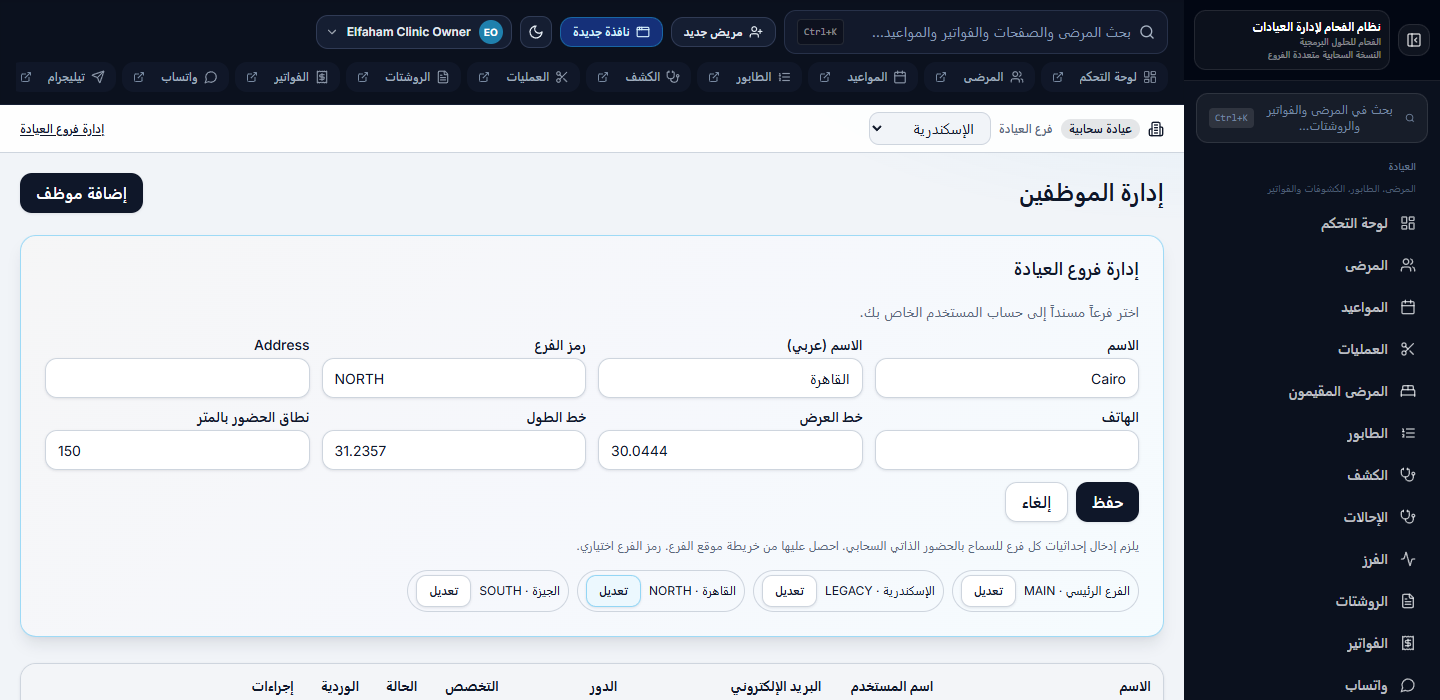
Elfaham Clinic Cloud — Multi-Branch — Branch management

Branch management
switch only to branches granted to your role
03 — Modules
One module at a time: title, presentation copy, a real app screenshot, then related screens for that module. Switch light/dark and language, then click any image to open fullscreen.
Group 1
Members & CRM
Members covers profiles and membership history.
Members & CRM
Attendance covers barcode, QR, and PIN check-in.
Members & CRM
Subscriptions covers plans and renewals.
Members & CRM
Leads covers prospect pipeline.
Members & CRM
Visitors covers day passes and walk-ins.
Members & CRM
Renewals covers expiring member follow-ups.
Members & CRM
Invitations covers guest passes.
Members & CRM
Employers covers corporate accounts.
Group 2
Communications & WhatsApp
WhatsApp covers reminders and messaging.
Communications & WhatsApp
Telegram owner bot covers daily dashboard and reports.
Group 3
Programs & Operations
Plans covers pricing and bundled services.
Programs & Operations
Classes covers schedules and enrollments.
Programs & Operations
Private sessions covers PT bookings.
Programs & Operations
Workouts and nutrition covers personal plans.
Programs & Operations
Services covers spa and wellness balances.
Programs & Operations
Shifts covers staff scheduling.
Programs & Operations
Staff self-service portal is part of day-to-day operations.
Programs & Operations
External coaches and classes is part of day-to-day operations.
Programs & Operations
Gym trainings covers in-house programs.
Programs & Operations
Holidays and closed days is part of day-to-day operations.
Group 4
Sales & Finance
Payments covers membership receipts.
Sales & Finance
Products covers retail catalog and stock.
Sales & Finance
Point of sale covers checkout.
Sales & Finance
Cash account covers sessions and invoices.
Sales & Finance
Returns covers refunds and product returns.
Sales & Finance
Financial closing covers daily and monthly.
Sales & Finance
Accounting covers ledger and reconciliation.
Sales & Finance
Procurement covers suppliers and POs.
Group 5
Reports & Administration
Dashboard covers KPIs and module hub.
Reports & Administration
Reports covers operational analytics.
Reports & Administration
Staff covers roster, payroll, commissions.
Reports & Administration
Settings covers gym profile, license, biometric, and LAN companions.
Reports & Administration
Data import and migration is part of day-to-day operations.
04 — Cards & documents
Bilingual prescription and thermal invoice receipt — as printed from the clinic system.
Printed documents
Bilingual prescription and thermal invoice receipt — exactly as printed in clinic.
bilingual Rx document
thermal printout
05 — Solutions
Four scenarios from a real clinic day — and how the system answers each one.
06 — Capabilities
What the system delivers for desk, sales, and comms — grouped by work area.
Group 1
profiles, allergies, documents, and history
vitals and nursing notes
07 — Downloads & Setup
Download the application, documentation, and product resources.
Clinic Cloud Platform
Download the Windows desktop app or Android app, or install the mobile web app on iPhone. Each clinic keeps an isolated workspace, and staff can switch only between branches granted to their account.
Android Cloud 1.2 installs alongside previous releases. On iPhone, install the mobile web app from the clinic link. An active Clinic license and clinic credentials are required for the apps and cloud panel. After issuing a license, an administrator can send the clinic link and initial owner sign-in details; the owner can change the password after signing in.
Request a clinic tenant and licenseEach clinic has an isolated cloud workspace. An active Clinic license is required; user permissions determine which branches they can access.
SOAP notes, diagnoses, and care plans
bilingual Rx PDF and drug interaction checks
Group 2
patient messaging and templates
Group 3
scheduling and doctor calendars
check-in and waiting list
Group 4
invoices, receipts, and patient AR
dispensing, stock, and inventory links
Group 5
clinic KPIs, appointments, and module hub
clinical, operational, and financial PDF export
revenue, growth, and clinic analytics